


Who really has admin in your Jira site? Three lists Jira keeps in three places
Also published on Atlassian Community
In this guide
Before an access audit someone always asks for "the list of Jira admins". It sounds like one export. In Jira Cloud it is three lists kept in three places, and none of them shows the other two.
AccessRadar is an access review app for Jira Cloud from Radrly. This guide builds one list of Jira admins from the three places Jira keeps them: organization and site admins, Administer Jira, and Administer spaces. The manual method comes first and works on any site; the app comes at the end.
Start with the table you will hand over
Decide the output first, then fill it. One row per person:
| Person | Organization or site admin | Administer Jira, through which group | Spaces they administer, and how | Account type |
|---|---|---|---|---|
| Example person | Site admin | jira-administrators | PAY, OPS (Administrators role) | Human |
The last column matters more than it looks. App accounts often sit in admin groups or hold Administer spaces, and auditors ask about them separately.
Column 1: organization and site admins
These roles live in Atlassian Administration, outside Jira. Go to Directory > Users and select a person to see their roles, or open Directory > Groups and read the members of the admin groups. Atlassian's default groups include an app admin group, a user access admin group, and org-admins or site-admins, which grant the organization admin role. Groups can be renamed, so check what access a group grants instead of trusting its name. Source: Give users admin permissions.
Two facts from What are the different types of admin roles? shape this column. Only organization admins can make another user a Jira app admin. And an app admin for Jira can make another user a space admin. Organization and site admins who want Administer Jira add themselves to the jira-administrators group, so they may hold no Jira permission today and still be one step away. They belong on the list.
Column 2: Administer Jira
Go to Settings > System > Global permissions (under Security). Find Administer Jira and note every group and user it is granted to. Then open each group under Directory > Groups and copy its members. People with this permission can create spaces and edit schemes and configuration, though they cannot manage users. Sources: Manage global permissions and View, grant and revoke global permissions.
Column 3: Administer spaces
This one is per permission scheme and per space. Go to Settings > Work items > Permission schemes, open each scheme's Permissions and find Administer spaces. In most schemes it is granted to the Administrators space role, so the people are defined in each space: Space settings > People in company-managed spaces, Space settings > Access in team-managed spaces. Space admins can add people and groups to the Administrators role themselves, as described in Add users and agents to space roles in your space.
With many spaces, GET /rest/api/3/user/permission/search?permissions=ADMINISTER_PROJECTS&projectKey=PAY returns the users who hold the permission in one space. It is still one call per space, and it returns people without the group or role behind each grant.
Reconcile
Merge the three columns on the person, then look for:
- People who appear only in column 1. They can reach Jira admin without anyone else.
- App accounts in any column.
- Groups that hold Administer Jira and also sit in the Administrators role of spaces.
- Spaces with nobody in column 3, where a Jira admin has to handle every settings change.
- People who administer many spaces through individual role entries.
Where the manual list falls short
Jira has no screen that lists every holder of a global permission as people, so you expand groups by hand. Space role membership is visible one space at a time. The list is a snapshot, and by the next audit someone has been added somewhere. The audit log at Settings > System > Audit log records global permissions added to or removed from a group, yet for changes made in user management pages, such as group membership, the Author field does not show who made the change. Atlassian lists this as a known issue in Audit activities in Jira.
The same table in AccessRadar
AccessRadar is read-only. It reads groups, roles and permission schemes into snapshots, weekly or on demand in Standard, and resolves who can administer what and through which path.
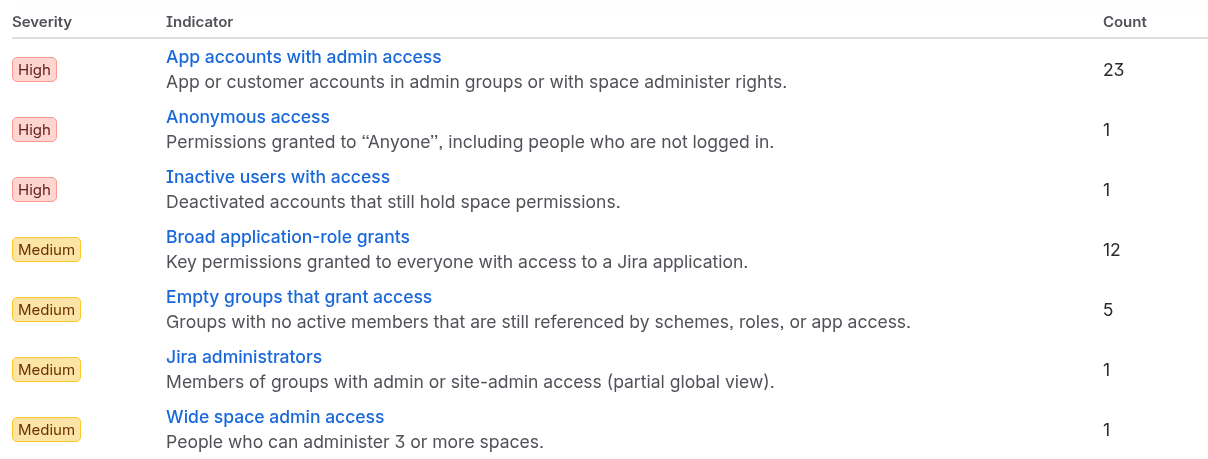
Four of its Standard risk indicators map to this table: Jira administrators (members of groups with admin or site-admin access), App accounts with admin access (app or customer accounts in admin groups or with space administer rights), Wide space admin access (people who administer three or more spaces by default; the threshold is a setting) and Spaces without a space admin.
The Groups view shows each group's admin, site-admin or app-user access type where Jira exposes it. For column 2 the app meets the same gap you meet by hand: Jira cannot list global permission holders. So the person view shows the global permissions the app can read for that person.
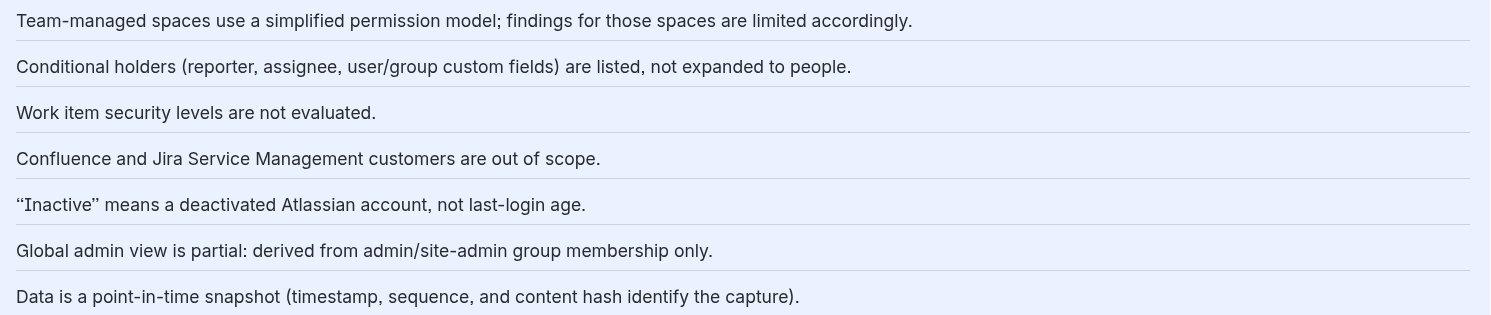
The coverage notes on every snapshot say this plainly: the global admin view is derived from admin and site-admin group membership only.
Keeping the list current:
- Standard: the weekly digest lists new admins, new space admins and app accounts with admin access; snapshot comparison shows what changed between two dates; access reviews record Keep, Revoke or Exception for each grant.
- Advanced: daily snapshot schedules, real-time in-app alerts for a new admin, a new space admin or an app account with admin access, and a Rovo agent that answers questions such as "Who can administer space PAY?". Alerts stay inside the app, with no email or Slack.
Quick answers
Where are Jira admins listed in Jira Cloud?
In three places. Organization and site admins are in Atlassian Administration under Directory > Users and Directory > Groups. Holders of the Administer Jira global permission are under Settings > System > Global permissions. Holders of Administer spaces are defined per permission scheme, usually through the Administrators space role in each space.
Can Jira list every person who holds the Administer Jira global permission?
No. Jira has no screen that lists global permission holders as people, so you note the groups the permission is granted to and expand each group under Directory > Groups by hand.
How do you find who can administer a space with many spaces?
The REST call GET /rest/api/3/user/permission/search with permissions=ADMINISTER_PROJECTS and a projectKey returns the users who hold the permission in that space. It is still one call per space, and it does not show the group or role behind each grant.
Which AccessRadar risk indicators help build the admin list?
Four Standard indicators map to it: Jira administrators, App accounts with admin access, Wide space admin access (three or more spaces by default, the threshold is a setting) and Spaces without a space admin. The coverage notes on every snapshot say that the global admin view is derived from admin and site-admin group membership only.